


We are delighted to welcome you to present or moderate at the SMACC Global Summit 2025: Foundations! Our aim with the Summit is to bring together voices from animal protection, technology, law enforcement, academia, social media, and policymaking. Together, we will explore strategies to reduce harm and build safer, more compassionate digital spaces.
Please read the details below and make sure you go through all of the required steps.
We hope you find this page helpful to get you well-prepared for the Summit. Should you have any other concerns that are not mentioned here, feel free to let us know via email at conference@asiaforanimals.com.

1. NEXT STEPS
Send the following profile information by September 26, 2025 at the latest to your respective correspondence (cc: conference@asiaforanimals.com).
If you have spoken at any AfA events before:
Please check our Speaker Lineup databases (profile photo page, 50-word bio page) to see if your photo/ bio, etc. are currently correct. If you would like to correct or update it, please email changes to the address above.
If you have not presented at an AfA event before:
Please email the following information to the addresses above.
-
Your complete name, pronouns, and name that you prefer to be called (if applicable);
-
Your role/designation in your organization;
-
The name of the organization you work with/are associated with
-
A brief profile/bio in English (50 words);
-
A high resolution portrait picture of yourself (color; 300 dpi, jpg format; plain background)
-
Kindly note: Please do not send a picture of yourself with any wild animals, as we do not wish to encourage wild animal interactions.
-

2. PRESENTING AT SMACC
GLOBAL SUMMIT 2025: FOUNDATIONS
SMACC Global Summit 2025: Foundations will be using Zoom as our event platform.
Most sessions will follow a similar format:
-
Introduction : 5 minutes for the moderator to introduce the session & the speakers.
-
Presentations: There will be a total of 5 speakers for the session (10 minutes presentation per speaker).
-
Q&A/Panel Discussion: 50 minutes. Your session organizer will let you know whether it's a Q&A session, or a panel discussion.
However, you may have discussed a variation in format with your session organizer. Please follow their instructions if this is so.

3. DATES OF THE SUMMIT
SMACC Global Summit 2025: Foundations is being held on October 16 and 17, 2025. Your session host will make it clear which day you are required (see invitation email).
Log in time:
-
ALL speakers are required to log in at 6:30 pm (GMT +8) for technical check and run through on the day of their session.
-
The event is scheduled to start at 7:00pm (GMT +8).
-
Even if your session is later in the program, we require you to join at the above time for technical checks.
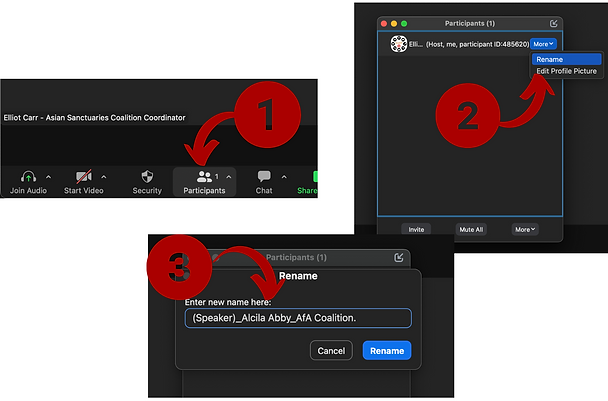%20(5).png)

.png)


4. PROMOTING THE EVENT
We kindly ask for your support in promoting this event on your individual social media platforms and sharing with your professional networks and colleagues.
For your followers and colleagues to register and participate via zoom, please share this link.
We have some promotional material you are free to use:
-
(To be constantly updated) Here is a link to a G-drive with promotional material, including graphics specific to your session.
-
Here is a link to the SMACC Global Summit 2025: Foundations webpage.
-
If you wish, add your organization's logo to any promotional material. Please keep the AfA logo.

5. TIPS FOR PRESENTING AT ONLINE EVENT
Guidelines to help you look and sound your best when presenting virtually on Zoom.
Make sure that your face is well-lit. It can help to have a light or window facing you. Conversely, having a bright light or window behind you can make your face appear dark. Experiment with your seating and camera position to see what looks good. You can make lights brighter by bringing them closer to you and softer by placing them further from you.
Pick an area that is calm and free of distraction. Keep the area behind you clean and without other people passing by or making noises.
If you have an external microphone, you may wish to experiment with it. Often the sound quality on an external microphone or even AirPods or a wired headset offers superior audio quality. And using a headset or earphones can help reduce audio feedback/echoes.
Check your video and audio settings. You can improve audio quality somewhat from within Zoom. From the toolbar at the bottom left of the meeting screen, check these two settings, which optimize sound for speech but interfere with music. First, select the arrow next to the mute button and select “Audio Settings.” When this menu opens, select “Advanced.” Within this main “Advanced” window, set the “Suppress Background Noise” to “Auto”. Second, open the secondary “Advanced” screen by clicking on the bottom right button. Make sure the “Echo Cancellation” is set to “Auto”. If you use other virtual recording tools, be sure to check similar settings in those.
Your connection may also improve if other people in your household are not streaming video at the same time as your call. You can do an internet speed test at www.speedtest.net or numerous other websites. A faster upload speed will result in your video looking clearer.